Siemens TIA Portal exercise using TON and TOFF timers to create delay ON and delay OFF logic in PLC programming with practical examples
This article discusses the exercise with delay timers (TON and TOFF) in the Siemens TIA Portal programming. The TON timer is used to delay activating the output after the input becomes active (ON). When the specified time (preset time) is reached, the timer output will turn on (ON). Conversely, the TOFF Timer functions to delay output shutdown after the input becomes inactive (OFF). During the preset time, the output remains active, and after the time ends, the output will turn OFF.
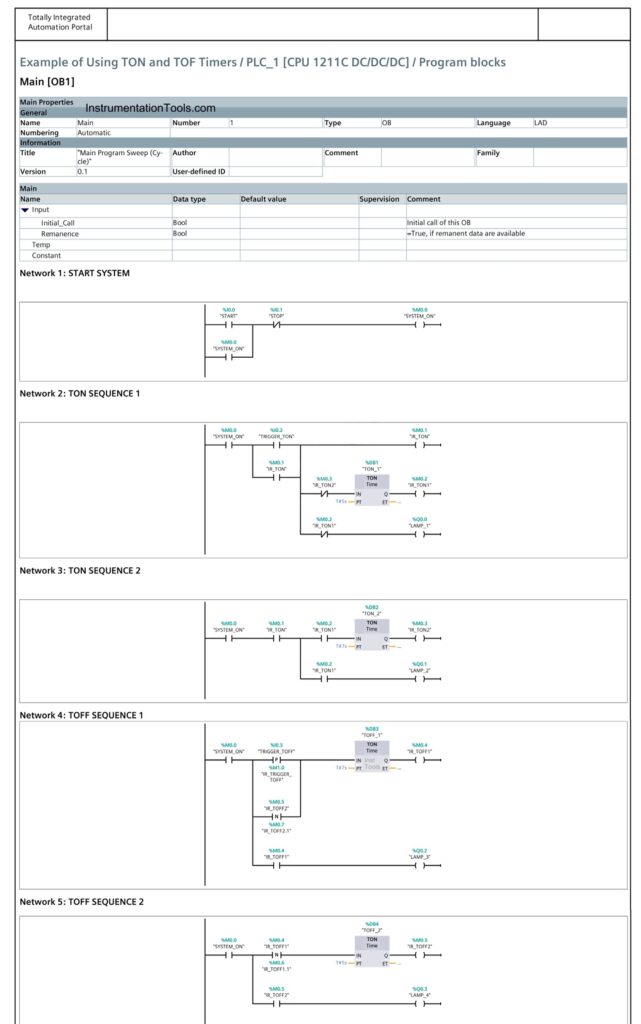
Timer TON (Timer On Delay) Sequence of Operation:
- Start: When the Trigger button is Pressed, the system will Start.
- Lamp 1 Turns On: Lamp-1 will turn ON, indicating that the first TON timer has started counting.
- 6-Second Countdown: The first TON timer will count down for 6 seconds.
- Lamp 1 Turns Off, Lamp 2 Turns On: After 6 seconds, Lamp-1 will turn Off, and Lamp-2 will turn On, indicating the second TON timer has started counting.
- 5-Second Countdown: The second TON timer will count down for 5 seconds.
- Reset First Timer: After 5 seconds, the first TON timer will reset, and the cycle will repeat.
- Repeat: The process will continue as long as the Stop button is not Pressed.
Timer TOFF (Timer Off Delay) Sequence of Operation:
- Start: When the Trigger button is Pressed (momentarily), the system will Start.
- 7-Second Countdown: The first TOFF timer will count down for 7 seconds.
- Lamp 3 Turns On: While the first TOFF timer is counting down, Lamp-3 will be ON.
- Lamp 3 Turns Off: After 7 seconds, Lamp-3 will turn Off.
- 5-Second Countdown: The second TOFF timer will Start counting down for 5 seconds.
- Lamp 4 Turns On: While the second TOFF timer is counting down, Lamp-4 will be ON.
- Lamp 4 Turns Off: After 5 seconds, Lamp-4 will turn off, and the first TOFF timer will Start counting again.
- Repeat: The process will continue as long as the Stop button is not Pressed.
Siemens TIA Portal Timer Programming
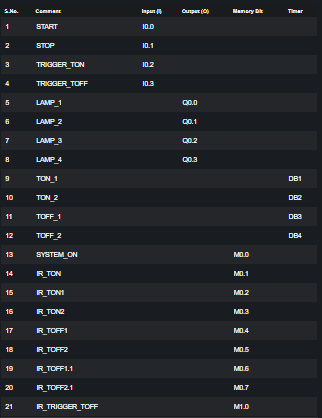
Mapping Details :-